Approve a pay application
Pay applications are AIA-formatted and Jobsite does the arithmetic — completed-to-date, retainage, and balance-to-finish — so you can review and approve with confidence.
- 1
Open the pay app
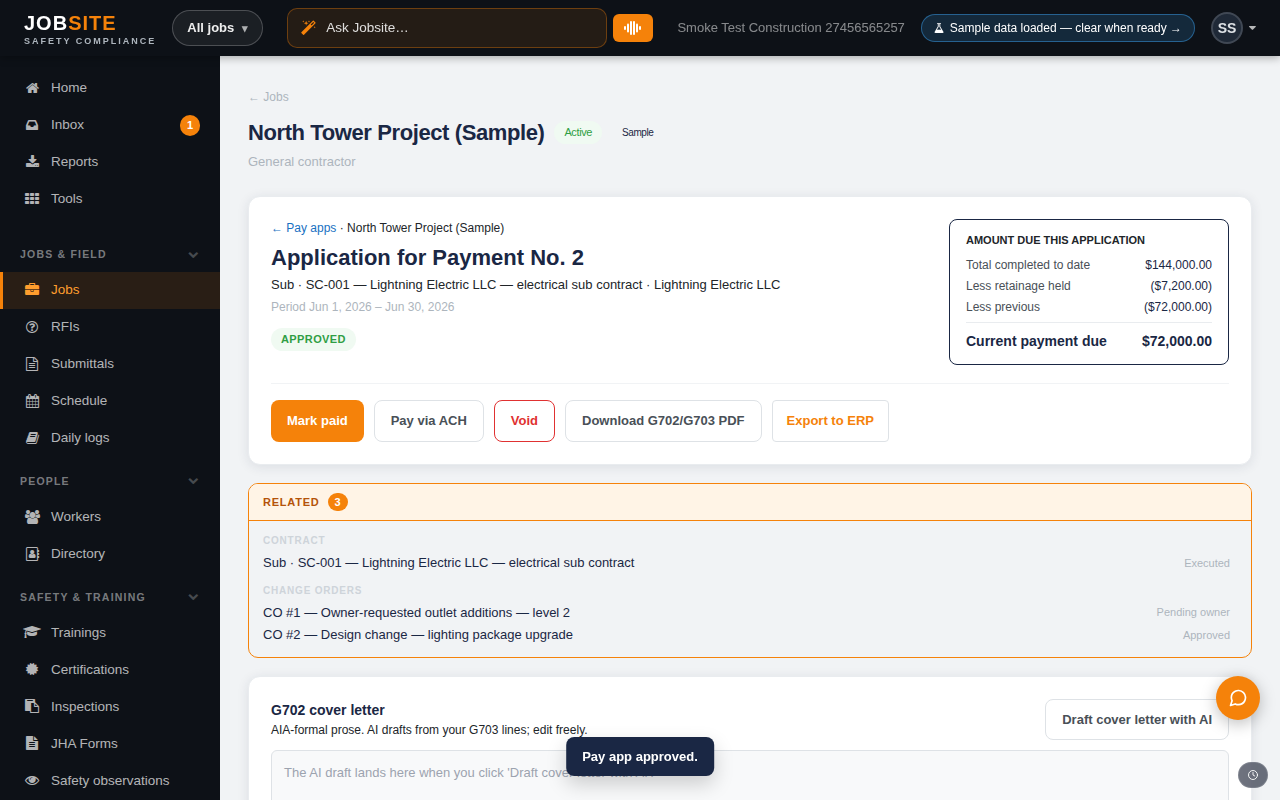
From a contract or the Pay apps register, open the application. You'll see the G702 cover with the amount due this period and the G703 continuation behind it.
app.jobsitecerts.com/dashboard/financial/pay-apps - 2
Review the numbers
Jobsite computes completed-to-date, less retainage, less previous, and current payment due automatically — and won't let a line over-bill against its balance. Check the related contract and change orders shown alongside.
- 3
Approve, pay, and export
Approve the application, then mark it paid or send ACH to the sub. Download the G702/G703 PDF, draft an AI cover letter, or use Send to accounting… to export it as a bill or owner invoice for QuickBooks, Sage or Foundation.
Want the bigger picture? See Financials on the platform →